D07.实战|实现支持结构化数据的流式对话系统
一、引言
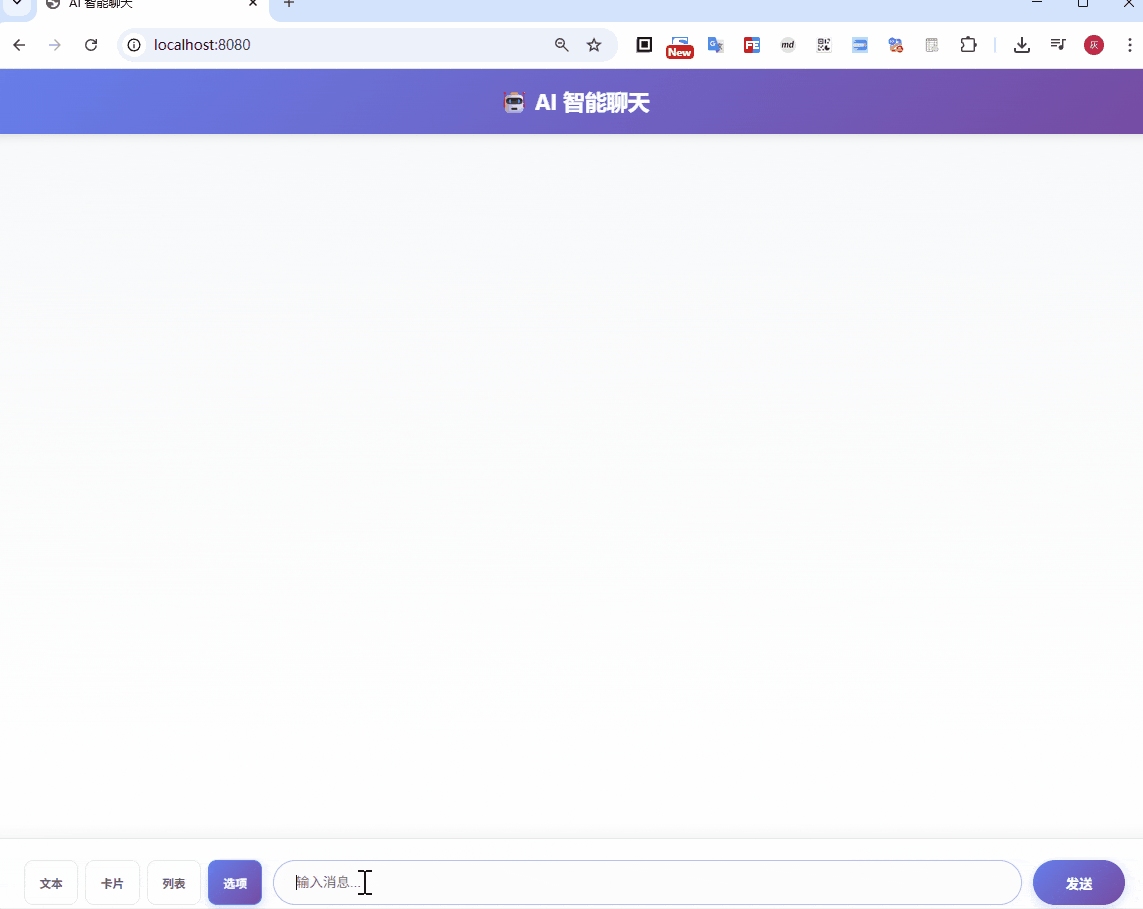
在传统的 AI 对话系统中,后端通常只能返回纯文本内容。然而,在实际应用场景中,我们往往需要展示更丰富的交互形式:天气卡片、知识问答题、数据图表、可点击选项等。
本文将介绍如何基于 Spring AI 实现一个简洁而强大的流式对话系统,该系统不仅支持文本的流式输出,还能通过 Prompt 工程让 AI 返回卡片、列表、选项等结构化数据,让对话框具备展示多样化 UI 的能力。
1.1 效果预览
我们的系统可以返回以下几种响应类型:
- text: 纯文本(如:"今天天气不错")
- card: 卡片结构(如:天气卡片,包含标题、副标题、描述等)
- list: 列表结构(如:推荐书单,每本书有标题、描述)
- options: 选项结构(如:选择题,用户可点击选项进行交互)
1.2 技术亮点
- 流式响应 (SSE): 使用 Server-Sent Events 实现实时数据推送
- Prompt 工程: 通过精心设计的 Prompt 引导 AI 返回结构化数据
- 简洁架构: 无需 Function Calling,降低实现复杂度
- 会话管理: 支持多轮对话上下文,实现连续交互
二、系统架构
2.1 整体结构
D06-ai-auto-chat/
├── src/main/
│   ├── java/com/git/hui/springai/app/
│   │   ├── dto/
│   │   │   ├── ChatRequest.java      # 请求 DTO
│   │   │   └── ChatResponse.java     # 响应 DTO
│   │   ├── mvc/
│   │   │   └── SimpleChatController.java   # 控制器
│   │   ├── service/
│   │   │   └── ChatService.java      # 服务层
│   │   └── D06Application.java                 # 启动类
│   └── resources/
│       ├── application.yml           # 配置文件
│       └── templates/simpleChat.html         # 前端页面
└── pom.xml                           # Maven 配置
2.2 核心组件
- Controller: 处理 HTTP 请求,暴露 RESTful API
- ChatService: 核心业务逻辑,处理会话管理和事件流
- DTOs: 数据传输对象,定义请求/响应格式
三、环境准备
3.1 技术栈
- JDK: 17+
- Spring Boot: 3.5.4
- Spring AI: 1.1.2
- LLM Provider: OpenAI(底层模型使用轨迹流动)
- 构建工具: Maven
3.2 项目依赖
pom.xml 核心依赖:
<dependencies>
    <!-- Spring Boot Starter -->
    <dependency>
        <groupId>org.springframework.boot</groupId>
        <artifactId>spring-boot-starter-web</artifactId>
    </dependency>

    <!-- Spring AI with OpenAI Compatible -->
    <dependency>
        <groupId>org.springframework.ai</groupId>
        <artifactId>spring-ai-starter-model-openai</artifactId>
    </dependency>

    <!-- Thymeleaf (前端页面) -->
    <dependency>
        <groupId>org.springframework.boot</groupId>
        <artifactId>spring-boot-starter-thymeleaf</artifactId>
    </dependency>

    <!-- Lombok -->
    <dependency>
        <groupId>org.projectlombok</groupId>
        <artifactId>lombok</artifactId>
        <optional>true</optional>
    </dependency>
</dependencies>
3.3 配置 API Key
在 src/main/resources/application.yml 中配置 SiliconFlow(兼容 OpenAI 接口):
spring:
  ai:
    openai:
      api-key: ${silicon-api-key}  # 从环境变量读取
      base-url: https://api.siliconflow.cn
      chat:
        options:
          model: Qwen/Qwen3-8B  # 使用通义千问模型

server:
  port: 8080
启动应用:
mvn spring-boot:run -Dsilicon-api-key=your-api-key-here
四、核心实现详解
4.1 数据结构定义
首先定义请求和响应的数据结构:
ChatRequest.java:
@Data
public class ChatRequest {
    /**
     * 用户消息
     */
    private String message;

    /**
     * 会话 ID(可选,用于多轮对话)
     */
    private String conversationId;

    /**
     * 响应类型:text, card, list, options
     */
    private String responseType = "text";
}
ChatResponse.java:
@Data
@Builder
@JsonInclude(JsonInclude.Include.NON_NULL)
public class ChatResponse {
    /**
     * 响应类型
     */
    private String type;

    /**
     * 文本内容(流式返回片段或完整文本)
     */
    private String content;

    /**
     * 结构化数据(card/list/options)
     */
    private Object data;

    /**
     * 错误信息
     */
    private String error;

    /**
     * 会话 ID
     */
    private String conversationId;

    /**
     * 是否完成
     */
    private Boolean done;

    // 内部静态类:卡片、列表项、选项等数据结构
    @Data
    @Builder
    public static class CardData {
        private String title;
        private String subtitle;
        private String description;
    }

    @Data
    @Builder
    public static class ListItem {
        private String title;
        private String description;
    }

    @Data
    @Builder
    public static class OptionItem {
        private String label;
        private String value;
        private String description;
    }
}
4.2 核心服务:ChatService
这是整个系统的核心,负责处理流式聊天和 Prompt 工程。
4.2.1 服务初始化
@Service
public class ChatService {
    private static final Logger log = LoggerFactory.getLogger(ChatService.class);

    private final ChatModel chatModel;
    private final ChatClient chatClient;
    private final ObjectMapper objectMapper;
    private final ChatMemory chatMemory;

    public ChatService(ChatModel chatModel, ObjectMapper objectMapper, ChatMemory chatMemory) {
        this.chatMemory = chatMemory;
        this.chatModel = chatModel;
        this.chatClient = ChatClient.builder(chatModel)
                .defaultAdvisors(MessageChatMemoryAdvisor.builder(chatMemory).build())
                .build();
        this.objectMapper = objectMapper;
    }
}
关键点:
ChatMemory接口支持多种实现(内存、Redis 等),默认使用内存进行存储ObjectMapper用于 JSON 解析
4.2.2 流式聊天主流程
public Flux<ChatResponse> streamChat(ChatRequest request) {
    String conversationId = getOrCreateConversationId(request.getConversationId());

    // 构建提示词,根据响应类型调整输出格式
    String prompt = buildPrompt(request.getMessage(), request.getResponseType(), conversationId);

    // 使用 ChatClient 进行流式调用
    StringBuilder context = new StringBuilder();

    return chatClient.prompt(prompt)
            .stream()
            .content()
            .map(content -> {
                context.append(content);
                return createStreamResponse(content, request.getResponseType(), conversationId);
            })
            .concatWith(Flux.defer(() -> {
                // 流式完成后,返回完整的结构化数据
                log.info("Stream completed, context length: {}", context.length());
                Object structuredData = RspExtractor.parseStructuredData(context.toString(), request.getResponseType());
                ChatResponse struct = null;
                if (structuredData != null) {
                    // 返回结构化的数据
                    struct = ChatResponse.builder()
                            .type(request.getResponseType())
                            .done(false)
                            .conversationId(conversationId)
                            .data(structuredData)
                            .build();
                }
                // 返回一个结束的标识
                ChatResponse finalResponse = ChatResponse.builder()
                        .type(request.getResponseType())
                        .conversationId(conversationId)
                        .done(true)
                        .build();
                if (struct != null) return Flux.just(struct, finalResponse);
                return Flux.just(finalResponse);
            }))
            .onErrorResume(error -> {
                log.error("Stream chat error", error);
                return Flux.just(ChatResponse.builder()
                        .type(request.getResponseType())
                        .error(error.getMessage())
                        .conversationId(conversationId)
                        .done(true)
                        .build());
            });
}
流程说明:
- 获取会话 ID: 如果未提供则创建新的 UUID
- 构建 Prompt: 根据响应类型动态调整提示词
- 流式调用: 使用
.stream().content()获取文本流 - 实时返回: 每收到一个文本片段就立即返回给前端
- 结构化解析: 流式结束后,尝试从完整内容中解析结构化数据
- 返回结果: 先返回结构化数据,再返回完成标记
注意:我们这里是一个极其简单的实现方式,要求返回要么是文本,要么是结构化数据,对于混合返回的场景,请看下一篇的改造
4.2.3 Prompt 工程:根据响应类型构建提示词
这是实现结构化数据返回的关键:(完全通过提示词来限制返回)
private String buildPrompt(String message, String responseType, String conversationId) {
    StringBuilder prompt = new StringBuilder();

    prompt.append(message);

    switch (responseType) {
        case "card":
            prompt.append("\n\n请以 JSON 格式返回一个卡片结构,包含 title(标题), subtitle(副标题), description(描述) 字段");
            break;
        case "list":
            prompt.append("\n\n请以 JSON 数组格式返回列表,每个列表项包含 title(标题), description(描述) 字段");
            break;
        case "options":
            prompt.append("\n\n请以 JSON 数组格式返回选项列表,每个选项包含 label(标签), value(值), description(描述) 字段");
            break;
        default:
            // text 类型不需要特殊处理
            prompt.append("\n\n请直接返回文本");
            break;
    }
    return prompt.toString();
}
关键点:
- 根据
responseType动态调整 Prompt - 明确告知 AI 需要返回的 JSON 格式
- 保存对话历史用于多轮对话
4.2.4 结构化数据解析:RspExtractor
从 AI 返回的文本中提取结构化数据:
public class RspExtractor {

    private static final ObjectMapper objectMapper = new ObjectMapper();

    /**
     * 从文本中解析结构化数据
     */
    public static Object parseStructuredData(String content, String responseType) {
        try {
            // 尝试从文本中提取 JSON
            String json = extractJson(content);
            if (json == null || json.isEmpty()) {
                return null;
            }

            // 根据响应类型解析为对应的数据结构
            return switch (responseType) {
                case "card" -> objectMapper.readValue(json, Map.class);
                case "list" -> objectMapper.readValue(json, List.class);
                case "options" -> objectMapper.readValue(json, List.class);
                default -> null;
            };
        } catch (Exception e) {
            // 解析失败返回 null,作为文本处理
            return null;
        }
    }

    /**
     * 从文本中提取 JSON 字符串
     * 支持 ```json ... ``` 或纯 JSON 格式
     */
    private static String extractJson(String content) {
        // 尝试匹配 ```json 代码块
        Matcher matcher = Pattern.compile("```(?:json)?\\s*([\\s\\S]+?)```").matcher(content);
        if (matcher.find()) {
            return matcher.group(1);
        }

        // 尝试直接查找 JSON 对象
        int start = content.indexOf('{');
        int end = content.lastIndexOf('}');
        if (start != -1 && end > start) {
            return content.substring(start, end + 1);
        }

        return null;
    }
}
4.3 Controller 层:SimpleChatController
提供 RESTful API 接口:
@RestController
@RequestMapping("/api/chat")
@CrossOrigin(origins = "*")
public class SimpleChatController {
    private final ChatService chatService;

    public SimpleChatController(ChatService chatService) {
        this.chatService = chatService;
    }

    /**
     * 流式聊天接口
     * POST /api/chat/stream
     * Content-Type: application/json
     * Accept: text/event-stream
     *
     * Body: {
     *   "message": "用户消息",
     *   "conversationId": "会话 ID(可选)",
     *   "responseType": "text|card|list|options"
     * }
     */
    @PostMapping(value = "/stream", produces = MediaType.TEXT_EVENT_STREAM_VALUE)
    public Flux<ChatResponse> streamChat(@RequestBody ChatRequest request) {
        log.info("Stream chat request: {}", request);
        return chatService.streamChat(request);
    }

    /**
     * 普通聊天接口(非流式)
     * POST /api/chat
     */
    @PostMapping
    public ChatResponse chat(@RequestBody ChatRequest request) {
        log.info("Chat request: {}", request);
        return chatService.chat(request);
    }

    /**
     * GET 方式的流式聊天接口(方便测试)
     * GET /api/chat/stream?message=xxx&conversationId=xxx&responseType=text
     */
    @GetMapping(value = "/stream", produces = MediaType.TEXT_EVENT_STREAM_VALUE)
    public Flux<ChatResponse> streamChatGet(
            @RequestParam String message,
            @RequestParam(required = false) String conversationId,
            @RequestParam(defaultValue = "text") String responseType) {

        ChatRequest request = new ChatRequest();
        request.setMessage(message);
        request.setConversationId(conversationId);
        request.setResponseType(responseType);

        log.info("Stream chat GET request: {}", request);
        return chatService.streamChat(request);
    }
}
五、响应格式说明
5.1 流式响应格式
流式返回时,每个事件都是一个 ChatResponse JSON 对象:
文本片段流:
{"type":"text","content":"今","conversationId":"xxx","done":false}
{"type":"text","content":"天","conversationId":"xxx","done":false}
{"type":"text","content":"天","conversationId":"xxx","done":false}
...
结构化数据(流式结束后返回):
{
    "type": "card",
    "data": {
        "title": "李白",
        "subtitle": "唐代浪漫主义诗人",
        "description": "李白(701年-762年),字太白,号青莲居士,是唐代最著名的诗人之一,被后人誉为“诗仙”。他以豪放不羁的个性、丰富的想象力和奔放的浪漫主义风格著称,代表作有《将进酒》、《静夜思》、《望庐山瀑布》等。李白的诗歌题材广泛,包括山水、饮酒、离别、思乡等,语言优美,意境深远,对后世文学影响极大。他与杜甫并称“李杜”,是唐代诗歌的巅峰代表之一。",
        "imageUrl": null,
        "actions": null,
        "extra": null
    },
    "conversationId": "d2541c6d-967c-40d8-a91e-b87791cca59c",
    "done": false
}
完成标记:
{"type":"text","conversationId":"xxx","done":true}
5.2 完整响应格式
非流式请求返回完整的 JSON 对象:
文本响应:
{
  "type": "text",
  "content": "这是 AI 的回复内容",
  "conversationId": "xxx",
  "done": true
}
卡片响应:
{
  "type": "card",
  "data": {
    "title": "天气卡片",
    "subtitle": "北京",
    "description": "今天天气晴朗,气温 25°C,适合户外活动。"
  },
  "conversationId": "xxx",
  "done": true
}
列表响应:
{
  "type": "list",
  "data": [
    {
      "title": "推荐书籍 1",
      "description": "这是一本好书"
    },
    {
      "title": "推荐书籍 2",
      "description": "值得一读"
    }
  ],
  "conversationId": "xxx",
  "done": true
}
选项响应:
{
  "type": "options",
  "data": [
    {
      "label": "选项 A",
      "value": "option_a",
      "description": "选项 A 的描述"
    },
    {
      "label": "选项 B",
      "value": "option_b",
      "description": "选项 B 的描述"
    }
  ],
  "conversationId": "xxx",
  "done": true
}
六、使用示例
6.1 请求文本回复
请求:
POST /api/chat/stream
Content-Type: application/json
Accept: text/event-stream

{
  "message": "讲个笑话",
  "responseType": "text"
}
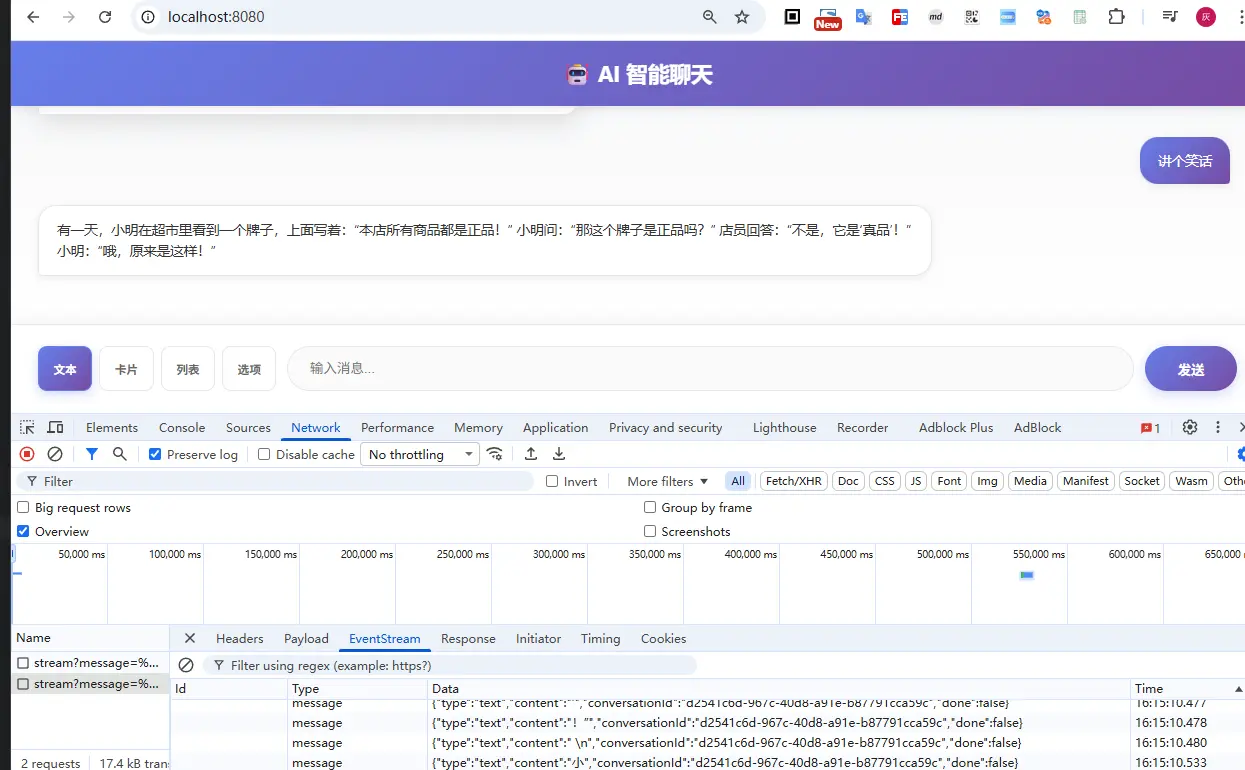
响应流:
data:{"type":"text","content":"有一天","conversationId":"d2541c6d-967c-40d8-a91e-b87791cca59c","done":false}
data:{"type":"text","content":",","conversationId":"d2541c6d-967c-40d8-a91e-b87791cca59c","done":false}
data:{"type":"text","content":"小","conversationId":"d2541c6d-967c-40d8-a91e-b87791cca59c","done":false}
data:{"type":"text","content":"明","conversationId":"d2541c6d-967c-40d8-a91e-b87791cca59c","done":false}
data:{"type":"text","content":"去","conversationId":"d2541c6d-967c-40d8-a91e-b87791cca59c","done":false}
data:{"type":"text","content":"理发","conversationId":"d2541c6d-967c-40d8-a91e-b87791cca59c","done":false}
...
data:{"type":"text","content":"强","conversationId":"d2541c6d-967c-40d8-a91e-b87791cca59c","done":false}
data:{"type":"text","content":"’","conversationId":"d2541c6d-967c-40d8-a91e-b87791cca59c","done":false}
data:{"type":"text","content":"的","conversationId":"d2541c6d-967c-40d8-a91e-b87791cca59c","done":false}
data:{"type":"text","content":"发型","conversationId":"d2541c6d-967c-40d8-a91e-b87791cca59c","done":false}
data:{"type":"text","content":"!”","conversationId":"d2541c6d-967c-40d8-a91e-b87791cca59c","done":false}
data:{"type":"text","conversationId":"d2541c6d-967c-40d8-a91e-b87791cca59c","done":true}
6.2 请求卡片回复
请求:
POST /api/chat/stream
Content-Type: application/json
Accept: text/event-stream

{
  "message": "推荐一道川菜",
  "responseType": "card"
}
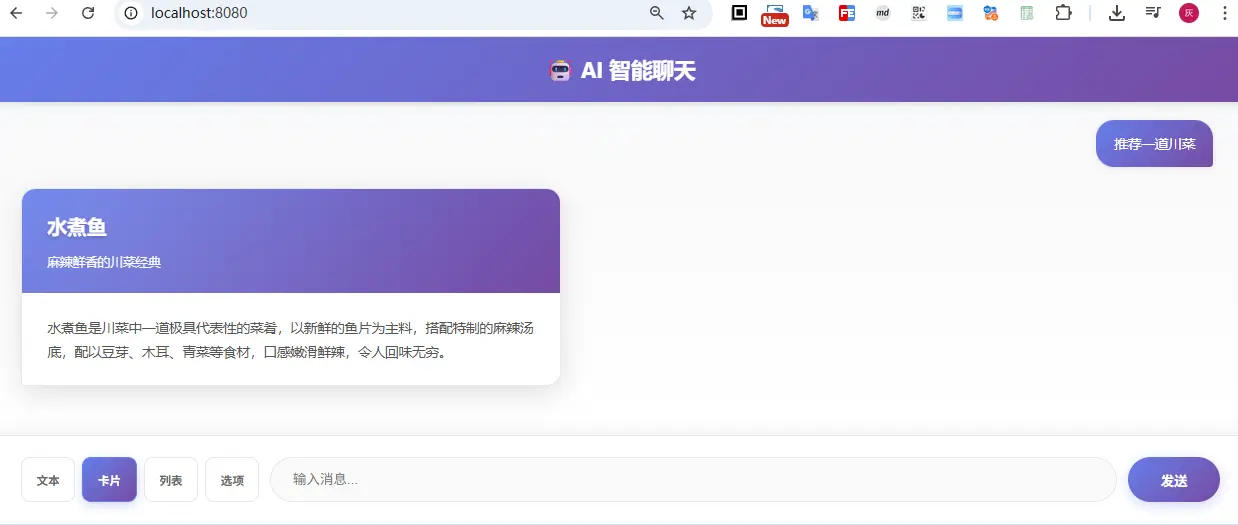
响应流:
data:{"type":"card","content":"```","conversationId":"d2541c6d-967c-40d8-a91e-b87791cca59c","done":false}
data:{"type":"card","content":"json","conversationId":"d2541c6d-967c-40d8-a91e-b87791cca59c","done":false}
data:{"type":"card","content":"\n","conversationId":"d2541c6d-967c-40d8-a91e-b87791cca59c","done":false}
data:{"type":"card","content":"{\n","conversationId":"d2541c6d-967c-40d8-a91e-b87791cca59c","done":false}
data:{"type":"card","content":" ","conversationId":"d2541c6d-967c-40d8-a91e-b87791cca59c","done":false}
data:{"type":"card","content":" \"","conversationId":"d2541c6d-967c-40d8-a91e-b87791cca59c","done":false}
data:{"type":"card","content":"title","conversationId":"d2541c6d-967c-40d8-a91e-b87791cca59c","done":false}
data:{"type":"card","content":"\":","conversationId":"d2541c6d-967c-40d8-a91e-b87791cca59c","done":false}
data:{"type":"card","content":" \"","conversationId":"d2541c6d-967c-40d8-a91e-b87791cca59c","done":false}
data:{"type":"card","content":"水煮鱼","conversationId":"d2541c6d-967c-40d8-a91e-b87791cca59c","done":false}
data:{"type":"card","content":"\",\n","conversationId":"d2541c6d-967c-40d8-a91e-b87791cca59c","done":false}
...(文本流式返回)...
{"type":"card","content":"```","conversationId":"d2541c6d-967c-40d8-a91e-b87791cca59c","done":false}
{"type":"card","data":{"title":"水煮鱼","subtitle":"麻辣鲜香的川菜经典","description":"水煮鱼是川菜中一道极具代表性的菜肴,以新鲜的鱼片为主料,搭配特制的麻辣汤底,配以豆芽、木耳、青菜等食材,口感嫩滑鲜辣,令人回味无穷。","imageUrl":null,"actions":null,"extra":null},"conversationId":"d2541c6d-967c-40d8-a91e-b87791cca59c","done":false}
{"type":"card","conversationId":"d2541c6d-967c-40d8-a91e-b87791cca59c","done":true}
AI 会先流式返回文本描述,然后在最后返回结构化的卡片数据。
6.3 请求列表回复
请求:
POST /api/chat/stream
Content-Type: application/json
Accept: text/event-stream

{
  "message": "推荐几本好看的科幻小说",
  "responseType": "list"
}
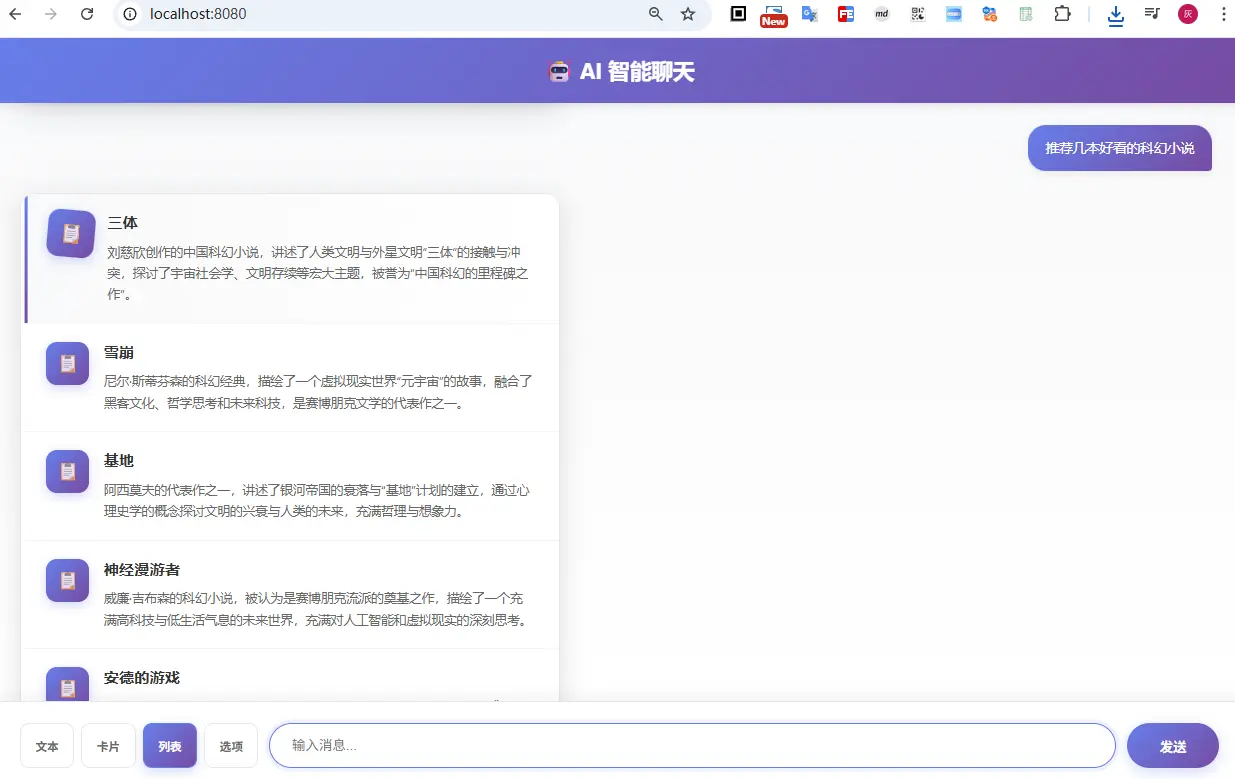
响应流:
data: {"type":"list","content":"《","conversationId":"abc123","done":false}
data: {"type":"list","content":"三","conversationId":"abc123","done":false}
data: {"type":"list","content":"体","conversationId":"abc123","done":false}
...(文本流式返回)...
data: {"type":"list","content":"","conversationId":"abc123","done":false}
data: {"type":"list","data":[{"title":"《三体》","description":"刘慈欣创作的长篇科幻小说,讲述了地球人类文明和三体文明的信息交流、生死搏杀及两个文明之间的冲突。"},{"title":"《流浪地球》","description":"刘慈欣短篇科幻小说,讲述了太阳即将毁灭,人类启动流浪地球计划的故事。"},{"title":"《北京折叠》","description":"郝景芳创作的中篇科幻小说,获得了第 74 届雨果奖中短篇小说奖。"}],"conversationId":"abc123","done":false}
data: {"type":"list","content":"","conversationId":"abc123","done":true}
6.4 请求选项回复
请求:
POST /api/chat/stream
Content-Type: application/json
Accept: text/event-stream

{
  "message": "我想学习编程,应该从哪种语言开始?",
  "responseType": "options"
}
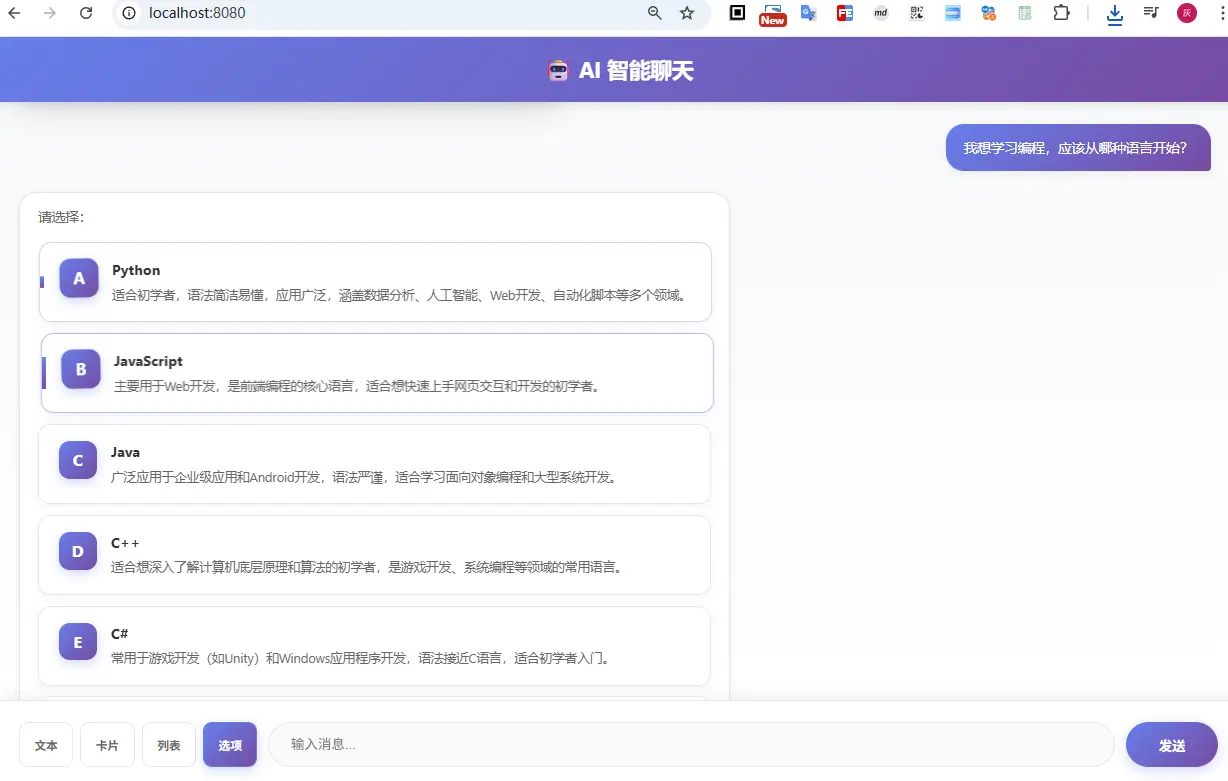
响应流:
data: {"type":"options","content":"建","conversationId":"abc123","done":false}
data: {"type":"options","content":"议","conversationId":"abc123","done":false}
...(文本流式返回)...
data: {"type":"options","content":"","conversationId":"abc123","done":false}
data: {"type":"options","data":[{"label":"Python","value":"python","description":"语法简洁,适合初学者,广泛应用于数据分析、人工智能等领域"},{"label":"JavaScript","value":"javascript","description":"Web 开发必备,前端后端都能使用,生态丰富"},{"label":"Java","value":"java","description":"企业级应用广泛,学习曲线较陡,但就业市场需求大"}],"conversationId":"abc123","done":false}
data: {"type":"options","content":"","conversationId":"abc123","done":true}
七、前端集成指南
7.1 使用 EventSource 接收 SSE 流
// 使用 EventSource 进行 SSE 流式请求
const params = new URLSearchParams({
    message: message,
    responseType: currentResponseType
});
if (conversationId) {
    params.append('conversationId', conversationId);
}

const eventSource = new EventSource(`/api/chat/stream?${params.toString()}`);

eventSource.onmessage = function(event) {
  const chatResponse = JSON.parse(event.data);

  // 处理错误
  if (chatResponse.error) {
    console.error('Error:', chatResponse.error);
    return;
  }

  // 流式文本内容
  if (chatResponse.content && !chatResponse.done) {
    appendText(chatResponse.content);
  }

  // 结构化数据
  if (chatResponse.data && !chatResponse.done) {
    handleStructuredData(chatResponse.type, chatResponse.data);
  }

  // 完成标记
  if (chatResponse.done) {
    console.log('Chat completed');
    eventSource.close();
  }
};

// 处理结构化数据
function handleStructuredData(type, data) {
  switch (type) {
    case 'card':
      renderCard(data);
      break;
    case 'list':
      renderList(data);
      break;
    case 'options':
      renderOptions(data);
      break;
    default:
      console.log('Unknown type:', type);
  }
}
7.2 渲染卡片示例
function renderCard(data) {
  const cardHtml = `
        <div class="card-header">
            <h3>${data.data.title || ''}</h3>
            ${data.data.subtitle ? `<p class="subtitle">${data.data.subtitle}</p>` : ''}
        </div>
        <div class="card-body">
            <p>${data.data.description || ''}</p>
        </div>
    `;
  document.getElementById('chat-container').innerHTML += cardHtml;
}
7.3 渲染列表示例
function renderList(items) {
  const listHtml = data.data.map(item => `
        <div class="list-item">
            <div class="list-item-icon">📋</div>
            <div class="list-item-content">
                <h4>${item.title || ''}</h4>
                <p>${item.description || ''}</p>
            </div>
        </div>
    `).join('');
  document.getElementById('chat-container').innerHTML += listHtml;
}
7.4 渲染选项示例
function renderOptions(options) {
  const optionsHtml = `
        <p style="margin-bottom: 12px; color: #666;">${data.content || '请选择:'}</p>
        <div class="options-container">
            ${data.data.map((opt, index) => `
                <div class="option-card" onclick="selectOption('${opt.value}')">
                    <div class="option-icon">${String.fromCharCode(65 + index)}</div>
                    <div class="option-content">
                        <div class="option-label">${opt.label}</div>
                        ${opt.description ? `<div class="option-description">${opt.description}</div>` : ''}
                    </div>
                </div>
            `).join('')}
        </div>
    `;
  document.getElementById('chat-container').innerHTML += optionsHtml;
}

// 用户点击选项后的处理
function selectOption(value) {
    document.getElementById('chatInput').value = value;
    sendMessage();
}
7.5 完整的聊天界面示例
请直接到项目查看源码 https://github.com/liuyueyi/spring-ai-demo/tree/master/app-projects/D06-ai-auto-chat
<!DOCTYPE html>
<html lang="zh-CN">
<head>
  <meta charset="UTF-8">
  <title>AI 智能对话</title>
  <style>
    .chat-container { max-width: 800px; margin: 0 auto; padding: 20px; }
    .message { margin: 10px 0; padding: 10px; border-radius: 5px; }
    .user-message { background-color: #e3f2fd; }
    .ai-message { background-color: #f5f5f5; }
    .card { border-left: 4px solid #2196F3; padding: 15px; margin: 10px 0; }
    .option-btn { display: block; width: 100%; padding: 10px; margin: 5px 0; cursor: pointer; }
  </style>
</head>
<body>
  <div class="chat-container">
    <div id="messages"></div>
    <input type="text" id="userInput" placeholder="输入消息..." />
    <button onclick="sendMessage()">发送</button>
  </div>

  <script>
    let conversationId = null;

    async function sendMessage(message) {
      const input = message || document.getElementById('userInput').value;
      if (!input) return;

      // 显示用户消息
      appendMessage('user', input);
      document.getElementById('userInput').value = '';

      // 创建 AI 消息容器
      const aiMessageDiv = appendMessage('ai', '');
      let fullContent = '';

      // 发起流式请求
      const response = await fetch('/api/chat/stream', {
        method: 'POST',
        headers: { 'Content-Type': 'application/json' },
        body: JSON.stringify({
          message: input,
          conversationId: conversationId,
          responseType: 'text'
        })
      });

      const reader = response.body.getReader();
      const decoder = new TextDecoder();

      while (true) {
        const { done, value } = await reader.read();
        if (done) break;

        const chunk = decoder.decode(value);
        const lines = chunk.split('\n');

        for (const line of lines) {
          if (line.startsWith('data: ')) {
            try {
              const data = JSON.parse(line.slice(6));

              // 累积文本
              if (data.content) {
                fullContent += data.content;
                aiMessageDiv.textContent = fullContent;
              }

              // 处理结构化数据
              if (data.data) {
                handleStructuredData(data.type, data.data, aiMessageDiv);
              }

              // 更新会话 ID
              if (data.conversationId && !conversationId) {
                conversationId = data.conversationId;
              }
            } catch (e) {
              console.error('Parse error:', e);
            }
          }
        }
      }
    }

    function appendMessage(type, content) {
      const messagesDiv = document.getElementById('messages');
      const messageDiv = document.createElement('div');
      messageDiv.className = `message ${type}-message`;
      messageDiv.textContent = content;
      messagesDiv.appendChild(messageDiv);
      return messageDiv;
    }

    function handleStructuredData(type, data, container) {
      // 根据类型渲染不同的 UI 组件
      // ...(参考前面的渲染函数)
    }
  </script>
</body>
</html>
八、进阶技巧
8.1 会话历史管理
当前使用内存存储会话,生产环境建议使用 Redis/数据库:
MySql 集成建议:
@Bean
public ChatMemory jdbcChatMemory(ChatMemoryRepository chatMemoryRepository) {
    return MessageWindowChatMemory.builder()
            .chatMemoryRepository(chatMemoryRepository)
            .build();
}
8.2 Prompt 优化技巧
8.2.1 Few-Shot Prompting(少样本提示)
在 Prompt 中提供示例,帮助 AI 理解需要的格式:
private String buildPrompt(String message, String responseType, String conversationId) {
    StringBuilder prompt = new StringBuilder();

    // 添加示例
    if ("card".equals(responseType)) {
        prompt.append("示例:\n");
        prompt.append("用户:推荐一道菜\n");
        prompt.append("助手:{\"title\": \"宫保鸡丁\", \"subtitle\": \"经典川菜\", \"description\": \"...\"}\n\n");
    }

    prompt.append(message);
    // ... 其他逻辑

    return prompt.toString();
}
8.2.2 明确 JSON Schema
更详细地描述期望的 JSON 结构:
case "card":
    prompt.append("\n\n请严格按照以下 JSON Schema 返回:");
    prompt.append("\n{");
    prompt.append("\n  \"title\": \"字符串 - 卡片标题\",");
    prompt.append("\n  \"subtitle\": \"字符串 - 卡片副标题(可选)\",");
    prompt.append("\n  \"description\": \"字符串 - 详细描述\"");
    prompt.append("\n}");
    break;
8.3 错误处理与降级策略
public Flux<ChatResponse> streamChat(ChatRequest request) {
    String conversationId = getOrCreateConversationId(request.getConversationId());
    String prompt = buildPrompt(request.getMessage(), request.getResponseType(), conversationId);

    StringBuilder context = new StringBuilder();

    return chatClient.prompt(prompt)
            .stream()
            .content()
            .map(content -> {
                context.append(content);
                return createStreamResponse(content, request.getResponseType(), conversationId);
            })
            .concatWith(Flux.defer(() -> {
                try {
                    Object structuredData = RspExtractor.parseStructuredData(
                        context.toString(), request.getResponseType());

                    if (structuredData != null) {
                        return Flux.just(
                            ChatResponse.builder()
                                .type(request.getResponseType())
                                .data(structuredData)
                                .done(false)
                                .build(),
                            ChatResponse.builder()
                                .type(request.getResponseType())
                                .done(true)
                                .build()
                        );
                    }
                } catch (Exception e) {
                    log.warn("结构化数据解析失败,降级为文本响应", e);
                    // 降级:返回原始文本
                }

                return Flux.just(ChatResponse.builder()
                    .type(request.getResponseType())
                    .done(true)
                    .build());
            }))
            .onErrorResume(error -> {
                log.error("Stream chat error", error);
                return Flux.just(ChatResponse.builder()
                        .type(request.getResponseType())
                        .error("服务暂时不可用,请稍后重试")
                        .conversationId(conversationId)
                        .done(true)
                        .build());
            });
}
8.4 性能优化建议
- 使用连接池: 配置 HTTP 连接池减少握手开销
- 流式压缩: 启用 SSE 压缩减少带宽
- 缓存常用响应: 对常见问题缓存 AI 响应
- 异步处理: 使用异步 IO 提高并发能力
# application.yml - HTTP 连接池配置
spring:
  ai:
    openai:
      connection-pool:
        enabled: true
        max-total: 50
        max-per-route: 10
九、常见问题 FAQ
Q1: 为什么选择 SSE 而不是 WebSocket?
A:
- 简单性: SSE 基于 HTTP,无需额外握手,实现更简单
- 单向通信: 对话场景中主要是后端推前端,SSE 足够用
- 浏览器支持: 现代浏览器原生支持,无需 polyfill
- 断线重连: 自动重连机制,可靠性高
如果需要双向通信(如前端主动发送心跳),可以选择 WebSocket。
Q2: Prompt 工程和 Function Calling 有什么区别?
A:
Prompt 工程(本方案):
- 优势:实现简单,无需额外配置,兼容性强
- 适用:快速原型,简单的结构化需求
Function Calling:
- 优势:结构严谨,类型安全,可执行实际业务逻辑
- 适用:复杂场景,需要调用外部 API 或执行操作
最佳实践:简单场景用 Prompt 工程,复杂场景用 Function Calling。
Q3: 如何处理 AI 返回的非标准 JSON?
A:
- JSON 提取: 从文本中提取 JSON 片段(使用正则或字符串匹配)
- 容错解析: 尝试多种解析策略(代码块、直接查找等)
- 降级处理: 解析失败时返回原始文本
- Prompt 优化: 明确要求 AI 返回纯 JSON,不要额外说明
示例提取逻辑:
private static String extractJson(String content) {
    // 1. 尝试匹配 ```json 代码块
    Matcher matcher = Pattern.compile("```(?:json)?\\s*([\\s\\S]+?)```").matcher(content);
    if (matcher.find()) {
        return matcher.group(1);
    }

    // 2. 尝试直接查找 JSON 对象
    int start = content.indexOf('{');
    int end = content.lastIndexOf('}');
    if (start != -1 && end > start) {
        return content.substring(start, end + 1);
    }

    return null;
}
Q4: 如何扩展更多的响应类型?
A: 按照以下步骤添加新类型:
- 修改响应类型枚举:
// 在 ChatRequest 中
private String responseType = "text"; // text, card, list, options, timeline, ...
- 更新 Prompt 构建逻辑:
case "timeline":
    prompt.append("\n\n请以 JSON 数组格式返回时间线,每个事件包含 time(时间), event(事件), description(描述) 字段");
    break;
- 添加对应的数据结构:
@Data
@Builder
public static class TimelineItem {
    private String time;
    private String event;
    private String description;
}
- 前端渲染组件:
case 'timeline':
  renderTimeline(data);
  break;
十、总结与展望
10.1 本文要点
- 简洁架构: 无需 Function Calling,通过 Prompt 工程实现结构化数据返回
- 流式响应: 基于Spring AI + SSE 实现实时对话流
- 灵活扩展: 支持 text/card/list/options 多种响应类型
- 会话管理: 使用 ChatMemory 实现多轮对话上下文
- 易于集成: 前端使用标准 EventSource API 即可接入
10.2 技术选型对比
| 特性 | Prompt 工程方案 | Function Calling 方案 |
|---|---|---|
| 实现复杂度 | ⭐⭐⭐⭐⭐ 简单 | ⭐⭐⭐ 中等 |
| 灵活性 | ⭐⭐⭐⭐ 高 | ⭐⭐⭐⭐⭐ 极高 |
| 类型安全 | ⭐⭐⭐ 一般 | ⭐⭐⭐⭐⭐ 强 |
| 性能 | ⭐⭐⭐⭐⭐ 优 | ⭐⭐⭐⭐ 良 |
| 学习曲线 | ⭐⭐⭐⭐⭐ 平缓 | ⭐⭐⭐ 陡峭 |
10.3 后续优化方向
- 多模态支持: 集成图片识别、语音输入等多模态能力
- RAG 集成: 结合知识库实现检索增强生成
- 会话持久化: 使用 Redis 等存储会话历史
- 鉴权机制: 添加用户认证和权限控制
- 监控告警: 集成 Prometheus + Grafana 监控体系
- 性能优化: 响应缓存、连接池优化等
10.4 源码地址
完整代码已开源:
推荐阅读
零基础入门:
- LLM 应用开发是什么:零基础也可以读懂的科普文(极简版)
- 大模型应用开发系列教程:序-为什么你“会用 LLM”,但做不出复杂应用?
- 大模型应用开发系列教程:第一章 LLM到底在做什么?
- 大模型应用开发系列教程:第二章 模型不是重点,参数才是你真正的控制面板
- 大模型应用开发系列教程:第三章 为什么我的Prompt表现很糟?
- 大模型应用开发系列教程:第四章 Prompt 的工程化结构设计
- 大模型应用开发系列教程:第五章 从 Prompt 到 Prompt 模板与工程治理
- 大模型应用开发系列教程:第六章 上下文窗口的真实边界
- 大模型应用开发系列教程:第七章 从 “堆上下文” 到 “管理上下文”
- 大模型应用开发系列教程:第八章 记忆策略的工程化选择
- 大模型应用开发系列教程:第九章 上下文工程在企业知识库助手中的落地
实战
- 实战 | 两百行实现一个自然语言地址提取智能体
- 实战 | 基于SpringAI与大模型的零配置发票智能提取架构
- 实战 | 零基础搭建知识库问答机器人:基于SpringAI+RAG的完整实现
- 告别传统AI开发!SpringAI Agent + Skills重新定义智能应用
- Spring AI中的多轮对话艺术:让大模型主动提问获取明确需求
- 实战 | 我用SpringAI造了个「微信红包封面设计师」
参考资料
作者:一灰
项目地址:https://github.com/liuyueyi/spring-ai-demo
最后更新:2026-03-06
标签: #SpringAI #流式响应 #智能对话 #前后端分离 #结构化数据
欢迎关注我获取更多 AI 开发实战技巧! 🚀